Spectra Page Builder Review
Spectra Page Builder is a beginner-friendly, SEO-optimized, and performance-focused page builder plugin for your WordPress default editor. The plugin now has more than 1+ million active installations and 1.5k+ 5-star reviews. Get a Full-featured page builder to create a super-fast and truly amazing website.
Are you searching for a detailed comparison between Spectra free and pro plugins?
If so, then you’ve landed on the right webpage. I can explain this comparison better as I also use the Spectra Pro plugin on my various blogs.
I previously used other page builder plugins like Generateblocks or Kadence blocks, but after using Spectra, I can surely say it’s worth using on your website.
Spectra Pro plugin works with all types of WordPress themes. You can also check my in-depth Spectra review for a detailed features comparison of the Spectra page builder plugin.
In this in-depth comparison between Spectra Free vs Pro, you will know all features, pros & cons, pricing plans, discounts, and much more.
So, without further delay, let’s get started.
- Spectra Free vs Pro: Detailed Comparison With Features, Pros & Cons
- Spectra Free vs Pro Comparison
- Spectra Free vs Pro: Detailed Features Comparison
- Spectra Free vs Pro: Pros & Cons
- Spectra Pro Pricing: How Much Does Spectra Pro Cost?
- Spectra Lifetime Deal
- What To Choose Between Spectra Free vs Pro?
- FAQs | Spectra Free vs Pro
- Final Thoughts on Spectra Free vs Pro
Spectra Free vs Pro: Detailed Comparison With Features, Pros & Cons

What is Spectra?
| Feature | Description |
| 📦 Product | WPSpectra Page Buider |
| ✅ Type | WordPress Gutenberg Blocks plugin |
| 👍 Rating | 4.8 out of 5 ⭐⭐⭐⭐⭐ |
| 📖 Features | Fast loading, Lightweight, SEO-Friendly, responsive, 30+ blocks, etc. |
| 💰 Pricing | Free! Paid plans start from $69/year to a $699 one-time fee |
| ✂️ Discount | Flat 30% discount on all plans using my link |
| ⏰ Free Trial | No! 14 days a money-back policy for paid plans |
| 🆚 Alternatives | GenerateBlocks & Kadence Blocks |
| 🔗 Website | WPSpectra.com |
Spectra is the best drag-and-drop page builder plugin for WordPress from the renowned web developer Brainstorm Force. The Company behind the famous Astra WordPress Theme.
Previously, the Spectra page builder plugin was known as the Ultimate Addon for Gentenberg, which extends the functionality of the Gutenberg block editor.
Now, it’s rebranded as a Spectra page builder plugin.
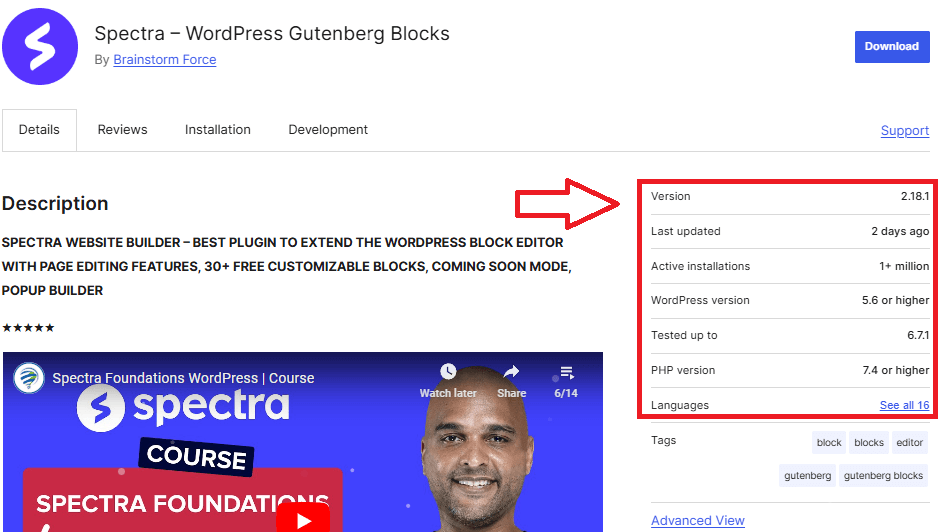
Spectra is the best beginner-friendly, SEO-optimized, and performance-focused plugin for your WordPress default editor with over 1+ million active installations and 1.0k+ 5-star reviews.
The Spectra plugin can add a variety of new and powerful blocks (30 Creative & Unique Blocks) to the Gutenberg editor.
Some of these blocks include advanced heading options, post grids, testimonials, call-to-action buttons, social share icons, and more.
Using the Spectra plugin, you can edit any part of your website or create a new one from scratch.
Here are the key features of the plugin:
How to Quickly Install Spectra Plugin?
It’s too easy to install Spectra’s free plugin, as you can install the free plugin just like any other WordPress plugin.
Just go to your WordPress dashboard and click on plugin > add new plugin.
Now search for Spectra in the search box above and install & activate the first result plugin.

You’ve successfully installed the Spectra free plugin.
Also Read: Rank Math Free vs Pro: Here’s How To Choose the Best Version?
Spectra Free vs Pro Comparison
Here is the detailed Spectra Free vs Pro comparison table that will help you better understand each free and pro plugin feature.
| Features | Spectra Free | Spectra Pro |
|---|---|---|
| Price | $0 | $69.00 |
| Container & Heading | ✔️ | ✔️ |
| Image & Icon | ✔️ | ✔️ |
| Buttons & Info Box | ✔️ | ✔️ |
| Call To Action | ✔️ | ✔️ |
| Countdown | ✔️ | ✔️ |
| Content Timeline | ✔️ | ✔️ |
| FAQ & Form | ✔️ | ✔️ |
| Google Maps | ✔️ | ✔️ |
| Icon List | ✔️ | ✔️ |
| Image Gallery | ✔️ | ✔️ |
| Lottie Animation | Limited | ✔️ |
| Marketing Button | ✔️ | ✔️ |
| Post Carousel & Grid | ✔️ | ✔️ |
| Price List | ✔️ | ✔️ |
| Review | ✔️ | ✔️ |
| Slider | ✔️ | ✔️ |
| Star Ratings | ✔️ | ✔️ |
| Social Share | ✔️ | ✔️ |
| Table of Contents | ✔️ | ✔️ |
| Tabs | ✔️ | ✔️ |
| Taxonomy List | ✔️ | ✔️ |
| Team & Testimonials | ✔️ | ✔️ |
| Advanced Row & Columns | ✔️ | ✔️ |
| Post Masonry | ✔️ | ✔️ |
| Animations | ❌ | ✔️ |
| Display Conditions | ❌ | ✔️ |
| Responsive Conditions | ❌ | ✔️ |
| Animation Effects | ❌ | ✔️ |
| Dynamic Content | ❌ | ✔️ |
| Loop Builder | ❌ | ✔️ |
| Popup Builder | ❌ | ✔️ |
| Slider Pro | ❌ | ✔️ |
| Modal Pro | ❌ | ✔️ |
| Image Gallery Pro | ❌ | ✔️ |
| Registration Form | ❌ | ✔️ |
| Global Block Style | ❌ | ✔️ |
| More Premium Blocks | ❌ | ✔️ |
| Link | Try Now | Buy Now |
Also Read: Kadence Blocks Review: Is Kadence Blocks Worth It?
Spectra Free vs Pro: Detailed Features Comparison
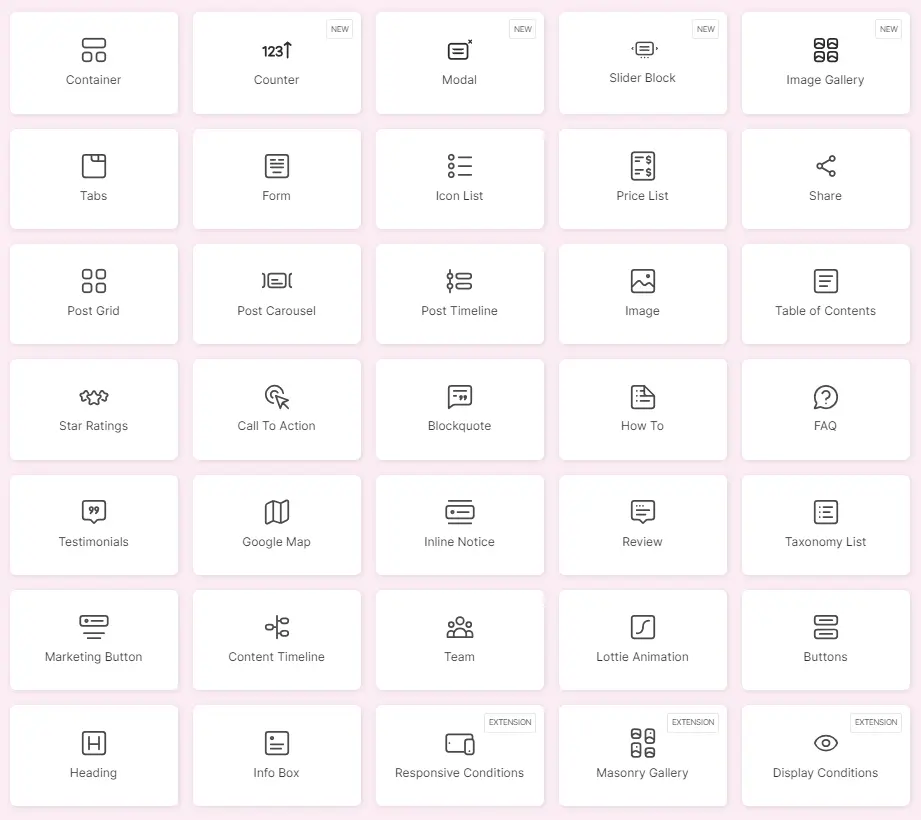
The above table describes what is included in the free version of Spectra and what is included in the pro version of Spectra.
Spectra Free comes with many features to get started with a normal website, while Spectra Pro is more suitable for advanced users, developers, or businesses.
The pro version offers a wider variety of blocks and premium features like dynamic content, pop-up builders, and integrations.
So, let’s find out what you get in Spectra’s free and paid versions.
Spectra Free Features
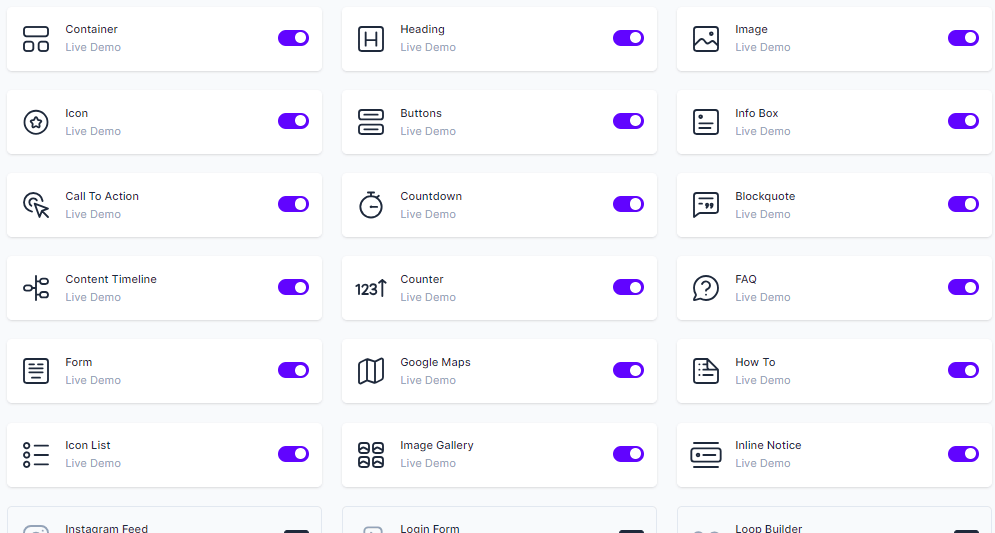
Spectra Free is a 100% beginner-friendly plugin that enhances the default WordPress block editor.
You don’t need any coding to customize your website, even in the free version.
Here are all the free features of the Spectra plugin that you will get after downloading the free plugin.
Container Block: The Container Block allows users to mix many blocks inside a single row, providing maximum flexibility in container layout and size options.
Heading Block: You can change your headers by adding a sub-heading, using a divider, or entirely customizing them.
Image Block: You can add images to your website and customize it with Spectra’s image block.
Buttons: The buttons block can add many buttons within a single section.
Info Box: An Info Box is a flexible block for creatively presenting a box with content (media, text, and buttons).
Call to Action: The Spectra’s Call to Action block comes with a title, description, and a button with the option of adding another button.
Countdown Block: The Spectra’s countdown block is essential if you want to create a sense of urgency for a limited-time offer or a countdown to an upcoming event.
Blockquote: It’s an effective block by Spectra free that allows you to insert essential data, such as the author’s photograph and a tweet button, between your text.
Content Timeline: You can add a title, description, icon, and date to the timeline items. The colour and typography settings allow you to customize the timeline to match the look of your website.
Counter Block: You can easily add a counter block with Spectra free.
FAQ: The FAQ block allows you to apply the FAQ Schema with one click on the page or blog post.
Forms Block: The Spectra Forms block is a powerful tool for creating attractive and practical forms without any coding skills or additional plugins.
Google Maps: Spectra’s Google Map block allows you to easily display a Google Map anywhere on your website.
How-to Schema: This block will automatically add How-to Schema to your website, which can improve your position in search results.
Icon List: The Icon list block in Spectra is ideal for highlighting the important things about a product or service. It may also be used to explain its functionality, with each feature accompanied by a suitable icon.
Image Gallery: Spectra has created an Image Gallery block that displays your photographs in a beautiful gallery structure anywhere on your website.
Inline Notice: This block is a simple block that helps you to highlight important notes.
Lottie Animation: This Spectra free plugin block allows you to quickly add some fantastic Lottie Animations to your websites.
Marketing Button: Spectra includes a marketing button block that can help you add attractive buttons to your website.
Modal Block: You can create a simple modal box with ease using Spectra Free.
Post Carousel: Spectra’s post carousel block consists of many blocks, such as post image, post taxonomy, and so on.
Post Grid: This block gives excellent alternatives for displaying posts in a grid format wherever you want.
Post Timeline: This block is similar to the content timeline. Only the content changes with the post, and everything will be the same.
Price List: This block allows you to include an attractive Price List anywhere on your website. You can enter the item’s name, picture, description, and price.
Review Schema: This block will let you quickly add schema to your reviews.
Separator: You can add a simple separator line or add elements like text and icons on it.
Slider Block: Use a Slider block to create professional-looking, responsive sliders with ease.
Social Share: This block enables anyone to share your content across many social networking platforms.
Star Ratings: The Star Rating block allows you to show star ratings anywhere on your Gutenberg pages.
Table of Contents: This is a one-of-a-kind block that lets you automatically generate a Table of Contents in the Gutenberg editor.
Tabs Block: This tab block comes with tons of customizations, styling, and layout options that help create Tabs in just a few clicks.
Taxonomy List: The Taxonomy List block allows you to place taxonomies anywhere on your website based on the current post type.
Team: Using team blocks, you can showcase your team members in several visually appealing ways, each with its own descriptive block.
Testimonials: Testimonials are positive feedback from satisfied customers that may be published on the site to increase credibility. The Testimonial block lets you display many testimonials in a lovely slider.
Advanced Columns: It is an excellent technique for organizing data into separate, manageable sections.
Advanced Row: Advanced rows are also an excellent technique for organizing data into separate, manageable sections.
Post Masonry: This block has options for displaying CPTs with a masonry layout. It allows you to choose among the numerous post types – posts, pages, media, or any CPT you have.
WP Search: This block allows you to include a WordPress search field.
Animations: Spectra has a large library of animations that can be applied to any block in its editor.
Masonry Gallery: This Block helps you create your images in a masonry gallery that looks more attractive.
Display Conditions: The Spectra Display conditions are the alternatives for hiding the block based on User State, User Role, Browser, and Operating System.
Responsive Conditions: The responsive condition option helps you decide how your website looks on different devices, like mobile, tablet, or PC.
Spectra Pro Features
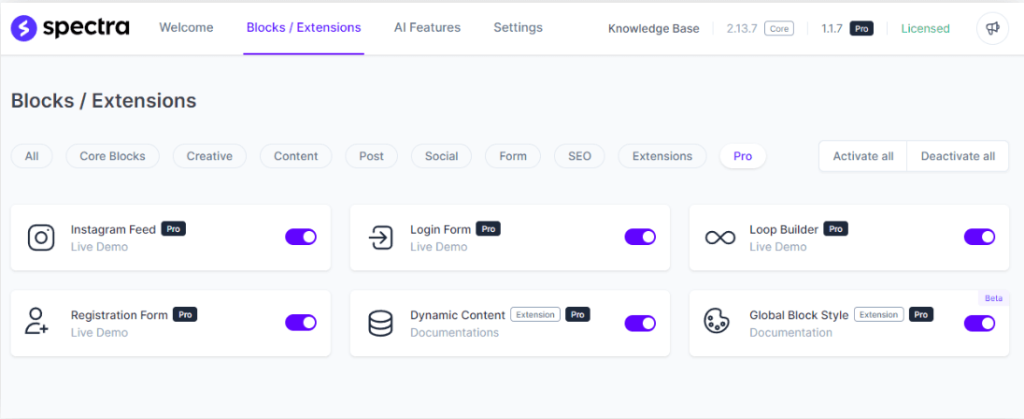
You will get all the features of the Spectra free plugin with 20+ powerful pro features, premium templates, and VIP support.
Spectra Pro makes customization easy and more attractive with a rich library of premium blocks, dynamic content options, and advanced customization settings.
Here are the features you will get with the Spectra Pro plugin:
Instagram Feed: The Instagram feed block allows you to easily show your Instagram photos anywhere on your website, engaging visitors and increasing interaction.
Login Form: This block of spectra provides your users with a login form for accessing specific features of your website.
Loop Builder: This powerful tool of Spectra Pro allows you to construct and arrange compelling content loops easily.
Popup Builder: Spectra Popup Builder allows you to build sitewide popups that will appear on any page of your website using various triggers, display rules, and other features.
Animation Effect: Get a more powerful animation option with Spectra Pro and make your website more engaging.
Registration Form: The User Registration Form Block lets you include blank fields on your website for people to fill up.
Dynamic Content: This powerful extension elevates website personalization to a whole new level, allowing you to easily create dynamic and personalized experiences for your visitors.
Global Block Style: Spectra’s Global Block Style feature helps you to design and manage consistent styles for your blocks throughout your whole website.
Premium Templates: Spectra will soon introduce premium templates that will give you pre-designed templates for lots of other niches.
24/7 Premium Support: Spectra’s experienced team will help you when you need any guidance related to the Spectra page builder plugin.
The Spectra Pro plugin gives you more customization options on these blocks, also:
- Slider Pro
- Modal Pro
- Image Gallery Pro
And more premium blocks that they add in the future.
Spectra Free vs Pro: Pros & Cons
You will get the detailed pros & cons of the Spectra free and pro plugins in this section of my Spectra free vs pro tutorial.
Pros & Cons of Spectra Free Plugin
Spectra Free Pros
Spectra Free Cons
Pros & Cons of Spectra Pro Plugin
Spectra Pro Pros
Spectra Pro Cons
Spectra Pro Pricing: How Much Does Spectra Pro Cost?
The pricing of Spectra pro is very affordable compared to the other page builder plugins in the market.
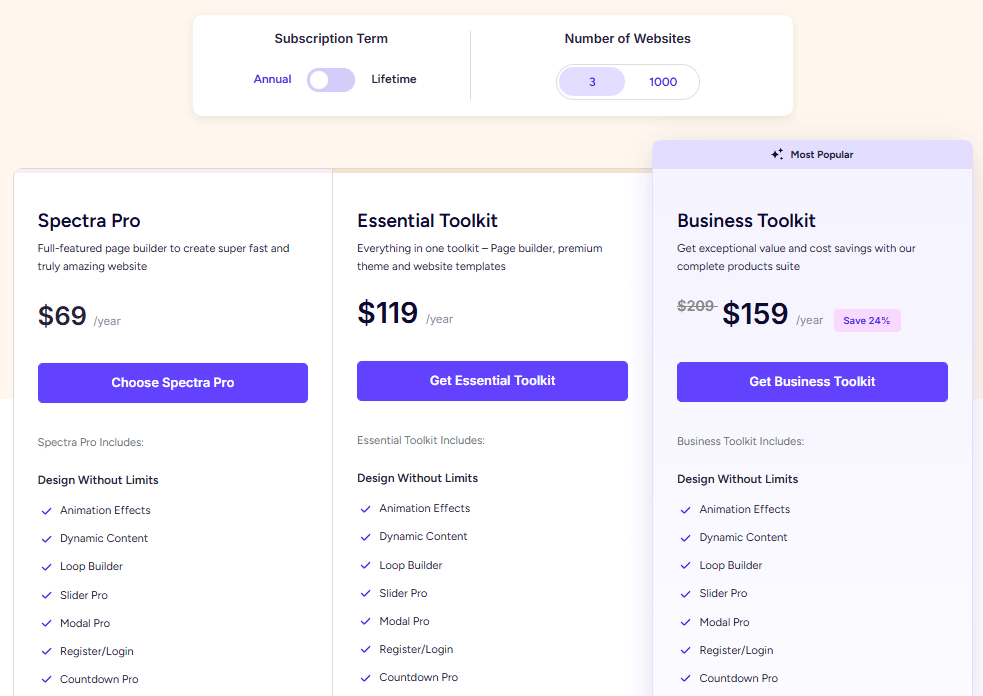
Spectra pro comes with three different plans: Spectra Pro, Essential Toolkit & Business Toolkit, along with a lifetime deal for all three plans.
You can also buy these plans for 3 websites & 1000 websites. I am mentioning the Spectra pro cost for 3 websites only.
Spectra Pro
The pricing of the Spectra pro plugin starts at only $69/year for 3 websites & $89/year for 1000 websites.
You will get all the premium features of the pro plugin, including:
Spectra Essential Toolkit
Spectra Essential toolkit bundle is best if you want the Spectra Pro plugin and the Astra Pro theme with premium starter templates.
The essential toolkit costs you $119/year for 3 websites and $199/year for 1000 websites.
Here’s what you get in this plan:
Spectra Business Toolkit
The Business toolkit bundle comes with all the themes and plugins of the company. You will get maximum savings in this plan on all of their products.
It will cost you $159/year for 3 websites and $219/year for 1000 websites.
Here are all the themes & plugins you will get in this plan:
Note: The above pricing plans are the discounted rates for my readers. The normal pricing of these plans costs you more than that.
Spectra Lifetime Deal
Spectra pricing plans also come with a lifetime deal for all three plans. The features will be the same as above, but the duration will be the lifetime period.
Here’s the detailed comparison table for the Spectra lifetime deal.
| Spectra Plan | 3 Website | 1000 Website |
| Spectra Pro | $319 | $399 |
| Essential Toolkit | $599 | $899 |
| Business Toolkit | $699 | $999 |
What To Choose Between Spectra Free vs Pro?
If you are reading this line, then you are interested in buying the Spectra pro plugin. So, in this section of my Spectra free vs pro tutorial, I will mention which plugin is best for your needs.
So, here’s the simple explanation for you:
You’ll probably be comfortable with the Spectra free plugin:
You’ll probably be comfortable with the Spectra Pro plugin:
FAQs | Spectra Free vs Pro
What is Spectra page builder?
Spectra is a drag-and-drop page builder plugin by Brainstorm Force that is also behind the famous theme Astra. It is a beginner-friendly plugin that comes with free and paid versions.
Is Spectra a free plugin?
Yes, Spectra comes with a free version that you can use for a lifetime period.
Is Spectra pro worth it?
Yes, the Spectra pro plugin is surely worth your money with its premium customization, beginner-friendly interface, and ability to create engaging pop-up builders.
Do I need coding skills to use the Spectra Page Builder?
No, Spectra Page Builder is built for the Gutenberg block editor, making it easy for users who don’t have any coding skills to create and edit web pages. It’s a user-friendly solution that empowers users to design websites visually.
What is the difference between Spectra One and Spectra Pro?
Spectra One is a WordPress theme by Spectra built with the Full Site Editing (FSE) feature, while Spectra pro is a WordPress page builder plugin.
What’s the refund policy for Spectra Premium?
Spectra Pro all plans come with a 14-day money-back guarantee.
Final Thoughts on Spectra Free vs Pro
No doubt, Spectra is the fastest-growing page builder plugin for WordPress, crossing 1+ million active installations recently.
It can surely remove two to three plugins from your WordPress website with more than 30+ blocks and other features.
After using Spectra Pro for more than a year, I strongly recommend you get the Spectra Pro plugin to create a professional-looking website or eCommerce Store.
The plugin works well with all types of WordPress themes, but Astra theme is the first choice as both come from the same company.
Let me know in the comments box if I missed something in my Spectra Free vs Pro plugin review.