
Bluehost Free Domain
Bluehost offers the lowest industry web hosting, starting at just $3.79/month with a free domain, free SSL, free CDN, & free website migration. With Bluehost web hosting, you get all the features, tools, and guidance you need to build and launch awe-inspiring WordPress websites. Click on the button below to claim your first Bluehost free domain name.
Are you looking for a Bluehost Free Domain Name in 2026?
If yes, then you are on the right web page. This detailed post is all about how to get a free domain from Bluehost.
Bluehost is the best budget-friendly web hosting provider in the market, hosting over 2 million+ domains around the world.
It is the leading web hosting provider and the first choice for beginners to create their first website.
So, in this article, I will show you whether you will get a free domain name from Bluehost or not, and also show you:
So, without further delay, let’s get started.
Does Bluehost Offer a Free Domain?
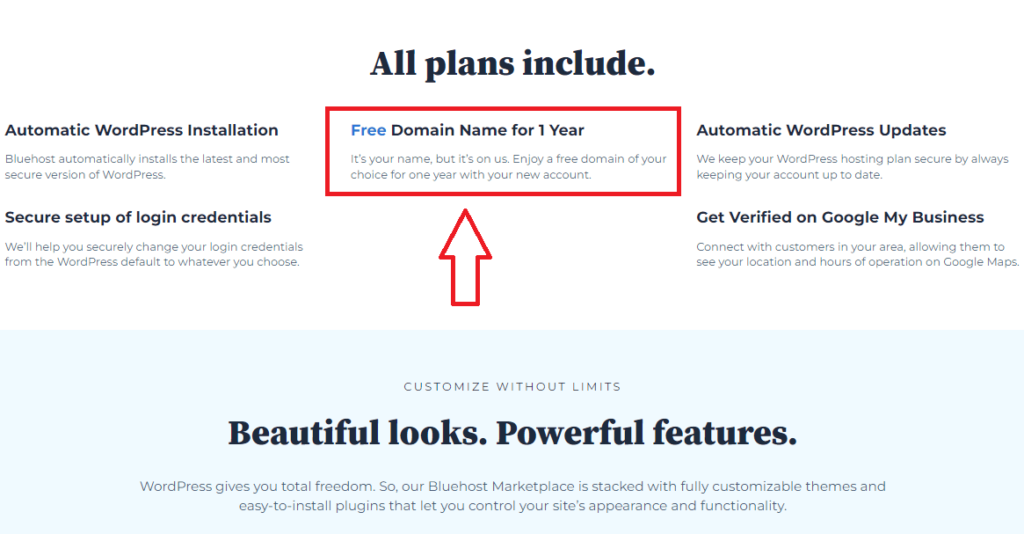
The answer is Yes, Bluehost offers a free domain when you sign up for any of their hosting plans.
That means when you purchase anyhosting plan from Bluehost, you will get a free domain name after following some steps.
The free Bluehost domain offer will be applicable only for the first year of your hosting plan.
After the first year of your hosting, you have to pay the domain cost applicable for the next year.
If you have already owned a domain with some other hosting provider and wanted to switch to Bluehost, then the domain cost will be free for the first year.
How to Claim Bluehost Free Domain Name?
To claim your free domain name from Bluehost, you have to purchase at least one hosting plan. You can also use my exclusive link to get an 62% discount on Bluehost hosting plans.
Follow the step-by-step process to claim your free Bluehost domain:
Step 1: Visit Bluehost
The first thing is to visit the official website of Bluehost.com by clicking on this like. (62% discount applied).
Step 2: Choose Your Hosting Plan
The next step is to choose your Bluehost hosting plan. Please note that Bluehost only offers a free domain when you sign up for any of their web hosting plans.
Without purchasing a hosting plan, you can’t be able to claim your free domain.
So, choose the basic shared hosting plan by clicking on the ‘Get Started‘ button.

Here you can see the Bluehost lowest shared hosting plan (Starter plan) that comes with $3.79 per month.
For only one domain name, Basic web hosting is the best choice for you. You will get these features with this plan:
Step 3: Choose Your Domain
The next step is to claim your free domain name from Bluehost. Basically, there are two options: ‘I want to use a domain I already own’ and ‘Choose domain later.’
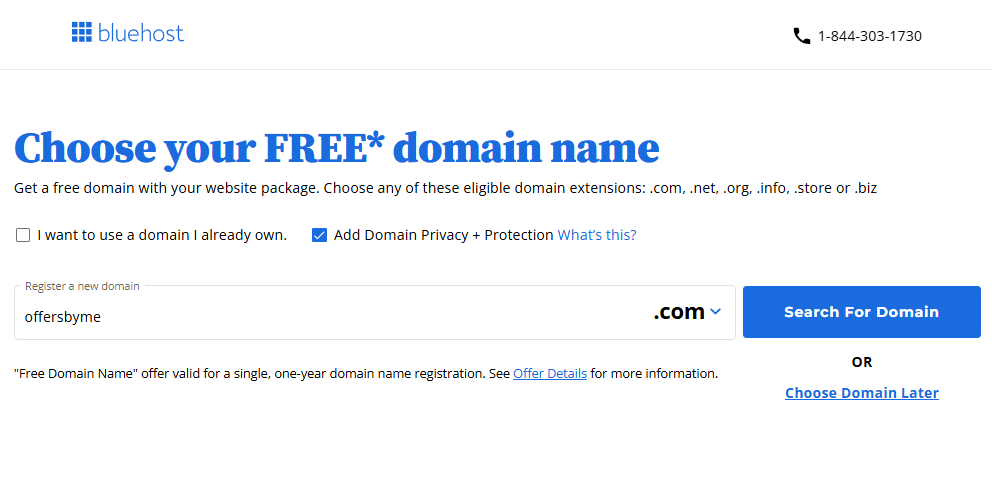
There’s also an option to ‘Add domain privacy + protection’ for your new domain, which I recommend you to add to your domain.
I recommend that you choose your domain as soon as possible and also add domain privacy protection. So, enter your domain name and choose your domain extension.
You can also choose your free domain name later.

Free domain names are available from Bluehost with a variety of extensions, including .com, .site, .online, .net, .space, .co, .info, .biz, .blog, .tech, .us, .org, and many more.
Popular domain extensions like .com, .org, and .net are more extensive compared to the less popular ones like .in, .tech, or .site, etc.
You have to pay domain charges after one year as a free domain is only applicable for the first year.
Note: If you didn’t claim your Bluehost free domain while signing up with Bluehost hosting then you may not get the option to get your free domain later. So, claim your domain in the above step.
Step 4: Choose Your Hosting Package Tenure & Addon
After choosing your free bluehost domain you will land on the checkout page where your all package details are mentioned.
Here, you need to choose the period of your web hosting. Bluehost offers 12-month and 36-month tenures for all hosting plans.
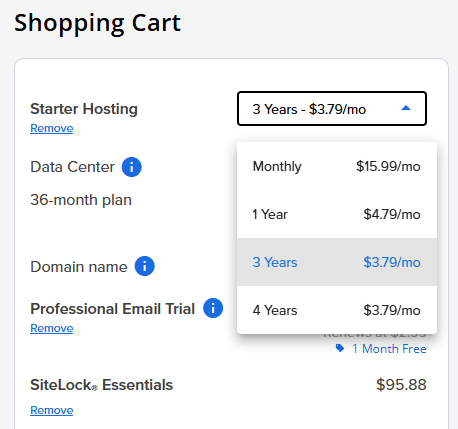
The 12-month tenure costs you $4.79/month, while the 36-month tenure will cost you 3.79/month.
Apart from that, there is also a domain privacy protection cost that costs you $11.88/year. If you don’t want domain privacy, you can delete it from your hosting account.
Bluehost also offers some additional package add-ons at an extra cost. Some of them are worth adding, and some are not.
Bluehost offers some package extra addons, which are Site Backup by Codeguard ($2.99/mon), Yoast SEO Premium ($2.99/mon), Single Domain SSL ($3.33/mon), and Sitelock Security ($2.99/mon).
There is also some more addon called “Content Creator Solution” which will cost you $3.99/month.
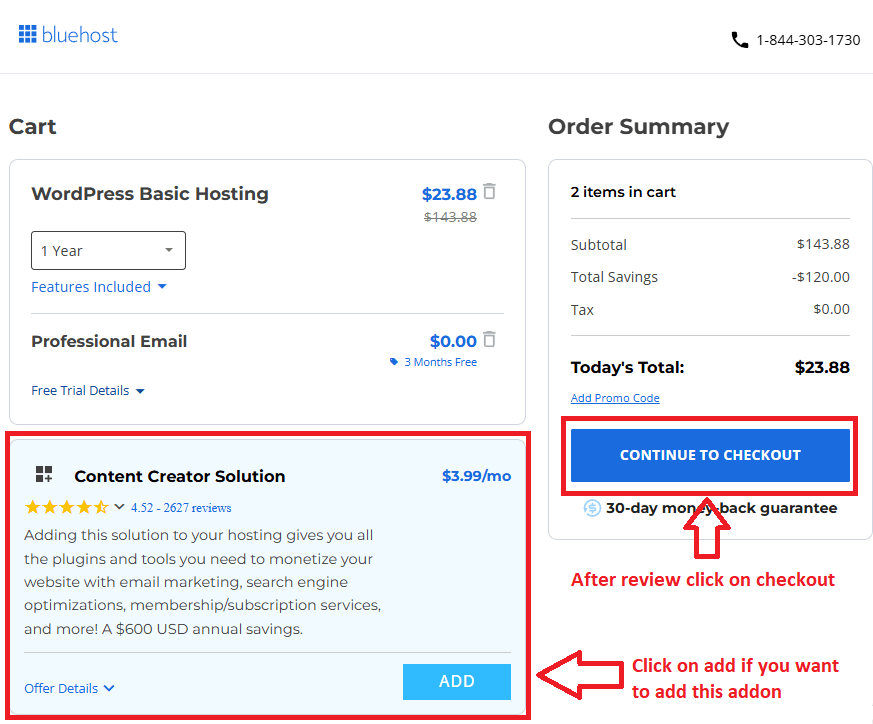
You can read my guide on ‘Is Bluehost Package Extras Worth It’ to know more about these addons.
I suggest you uncheck all the additional add-ons as they increase the billing amount. You can also purchase these add-ons later.
Now, click on the Continue to checkout button after the final step.
Step 5: Create Your Bluehost Hosting Account
Now, you know that you won’t get a Bluehost free domain until you purchase a hosting plan from Bluehost.
The next step is to create your new Bluehost hosting account by filling in some personal information in the mandatory field.
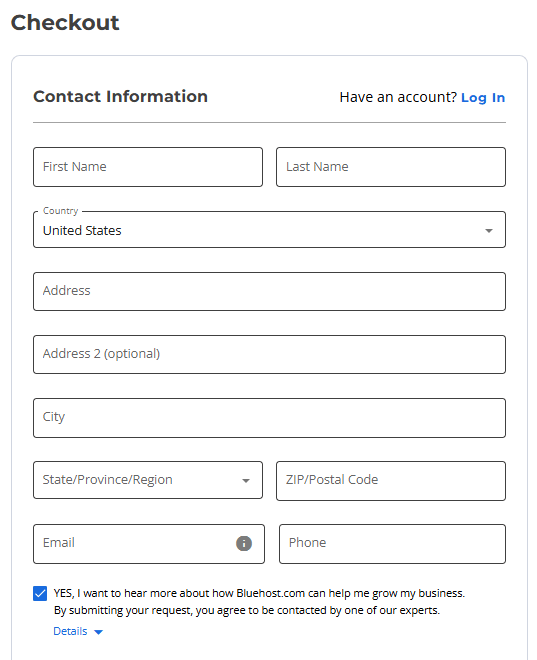
After that, accept the terms of service and choose the payment method.
There are two payment methods, which are PayPal and Credit Card. Select one of them and complete the payment to get your hosting account with Bluehost free domain name for the 1st year.
Finally, you have successfully completed all steps to get your Bluehost hosting account, including a free domain.
How Much Does Bluehost Domain Cost After the First Year?
The Bluehost domain renewal cost will depend on your TLD (Top Level Domain), and there are three types of top-level domains:
- Original Top-Level Domain Names
- Country-Code Top-Level Domain Names
- New Generic Top-Level Domain Names
The original top-level domain renewals are:
| Original Top-Level Domain | Registration | Renewal | Privacy |
| .com | $12.99 | $19.99 | $15.00 |
| .net | $14.99 | $19.99 | $15.00 |
| .biz | $9.99 | $21.99 | $15.00 |
| .info | $11.99 | $21.99 | $15.00 |
| .org | $9.99 | $19.99 | $15.00 |
The country-code top-level domain renewals are:
| Original Top-Level Domain | Registration | Renewal | Privacy |
| .ca | $11.99 | $17.99 | $15.00 |
| .cc | $24.99 | $29.99 | $15.00 |
| .co.uk | $24.99 | $29.99 | $15.00 |
| .me | $11.99 | $17.99 | $15.00 |
| .org.uk | $24.99 | $29.99 | $15.00 |
| .tv | $24.99 | $29.99 | $15.00 |
| .us | $5.99 | $19.99 | NA |
| .ws | $24.99 | $29.99 | $15.00 |
Note: Bluehost domain registration charges and renewal charges are non-refundable. For more details click here.
Bluehost Free Domain For Life
Lots of users Google some queries like; Bluehost free domain for life, Does Bluehost offer a free domain for life, Bluehost lifetime domain, etc.
But Bluehost doesn’t offer any type of domain name for a lifetime. You must have to renew your domain every year.
You are qualified to have a Bluehost free domain for life if you have a standard account that was created before February 22, 2011 (22/2/2011).
Bluehost’s offer to include the free domain name is the finest value any web hosting provider presently has, even though you might not currently get the domain name for life.
Also Read:- Bluehost $2.65 Deal: Get Bluehost 75% Discount Deal
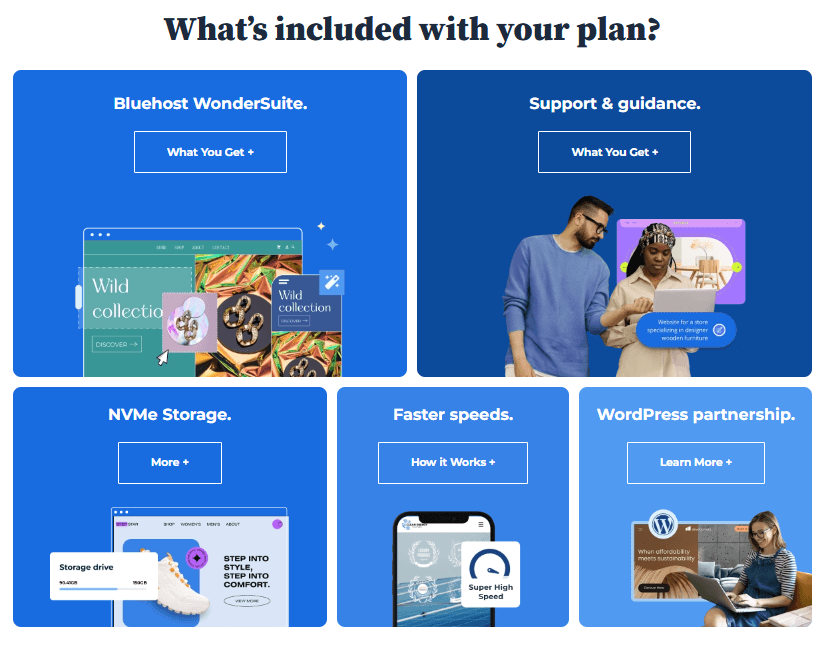
Why Choose Bluehost Free Domain? Bluehost Hosting Features
There are several benefits to choosing a free domain name from Bluehost. Some of them are mentioned below.
Cost Savings: Getting a free domain with your hosting plan saves you the expense of purchasing a domain separately. This can be particularly advantageous if you’re on a tight budget or starting a new website.
Integration with Hosting: When you register a domain with Bluehost, it is automatically linked to your hosting account. This simplifies the setup process and ensures that your domain and hosting are seamlessly connected, enabling you to start building your website quickly.
Restrict unauthorized domain transfers: Bluehost’s domain lock function allows you to stop unauthorized transfers.
Domain Privacy: By using the available domain privacy function, you may prevent spammers and others from accessing your domain information.
Domain management panel: There are a number of options that may be used to manage and control every part of your domain.
Domain Forwarding: If necessary, you can redirect your domain to different URLs using domain forwarding services.
Convenience: Bluehost provides a seamless domain registration process, allowing you to register your desired domain name directly through their platform. This eliminates the need to navigate and manage multiple accounts across different service providers.
Note: Bluehost offers only one domain name for the first year of their single hosting account.
FAQs on Bluehost Free Domain Name
Is Bluehost domain free?
Yes, Bluehost offers a free domain name for the first year when purchasing any web hosting plan.
How many Bluehost domains will I get?
When you sign up with Bluehost, you will get only one domain name for free for the first year.
How can I receive refunds for Bluehost domain names?
You will not get any refund for the Bluehost free domain name and any of their add-on services.
Is Bluehost free to host?
No, you can’t host any website until you purchase a web hosting plan from Bluehost. The basic shared hosting plan is for just $3.79 per month.
Conclusion
So this is all about how you can claim a free domain name from Bluehost. No doubt, Bluehost is the best hosting provider in the market with their services and uptime.
There are lots of big websites using Bluehost hosting and ranking really well on search engines.
The only thing you need to do is choose your best Bluehost hosting plan and claim your free Bluehost domain name.
Here is a detailed step-by-step guide on how to buy web hosting from Bluehost.